
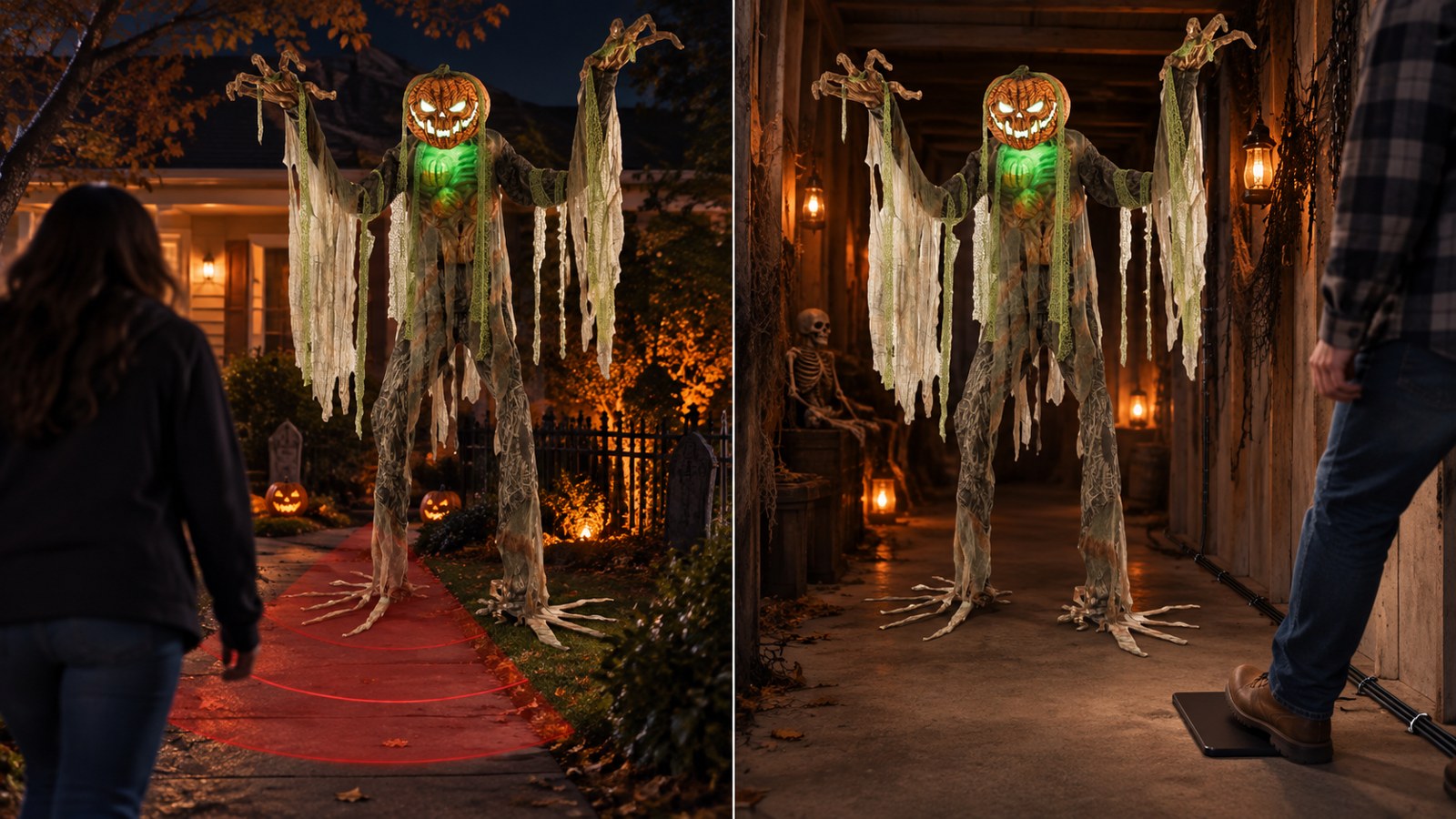
The best animatronic can still miss the scare if it activates at the wrong moment.
A guest sees the monster finish its routine before reaching it. A second group walks through while the prop resets. Someone steps around the trigger. Or a decoration moving in the breeze sets the whole thing off for an empty driveway.
That is why the trigger matters almost as much as the animatronic itself.
The short answer: choose a motion sensor when you need easy, hands-off activation across a wider approach area. Choose a step pad when the scare depends on a guest reaching one exact spot. For many home haunts, the strongest setup is an animatronic that supports both, so you can change the trigger after testing the scene.
Here is how the two options compare—and how to place each one so the prop fires when it will have the most impact.
Motion Sensor vs. Step Pad at a Glance
| Consideration | Motion sensor | Step pad |
|---|---|---|
| Best use | Open yards, porches, displays with several approach paths | Narrow hallways, doorways, queue turns, exact scare marks |
| Activation | Detects movement within the sensor's coverage area | Activates when a guest steps on the pad |
| Timing precision | Moderate; depends on sensor direction and range | High when guests must cross the pad |
| Setup | Fast, with little or no floor hardware | Requires pad placement and safe cable routing |
| Main risk | Early, late, or unwanted activation | Guests may miss, see, or step around the pad |
| Group traffic | May detect the front of a group before everyone is in position | First person on the pad activates the prop |
| Unattended display | Usually the more practical choice | Works best when the walking route is controlled |
| Best backup | Re-aim or mask the sensor's field of view | Move the pad to a natural choke point |
How a Motion Sensor Trigger Works
Many Halloween animatronics use an infrared motion sensor. When the sensor detects a person moving through its activation area, it starts the prop's programmed movement, sound, and lighting sequence.
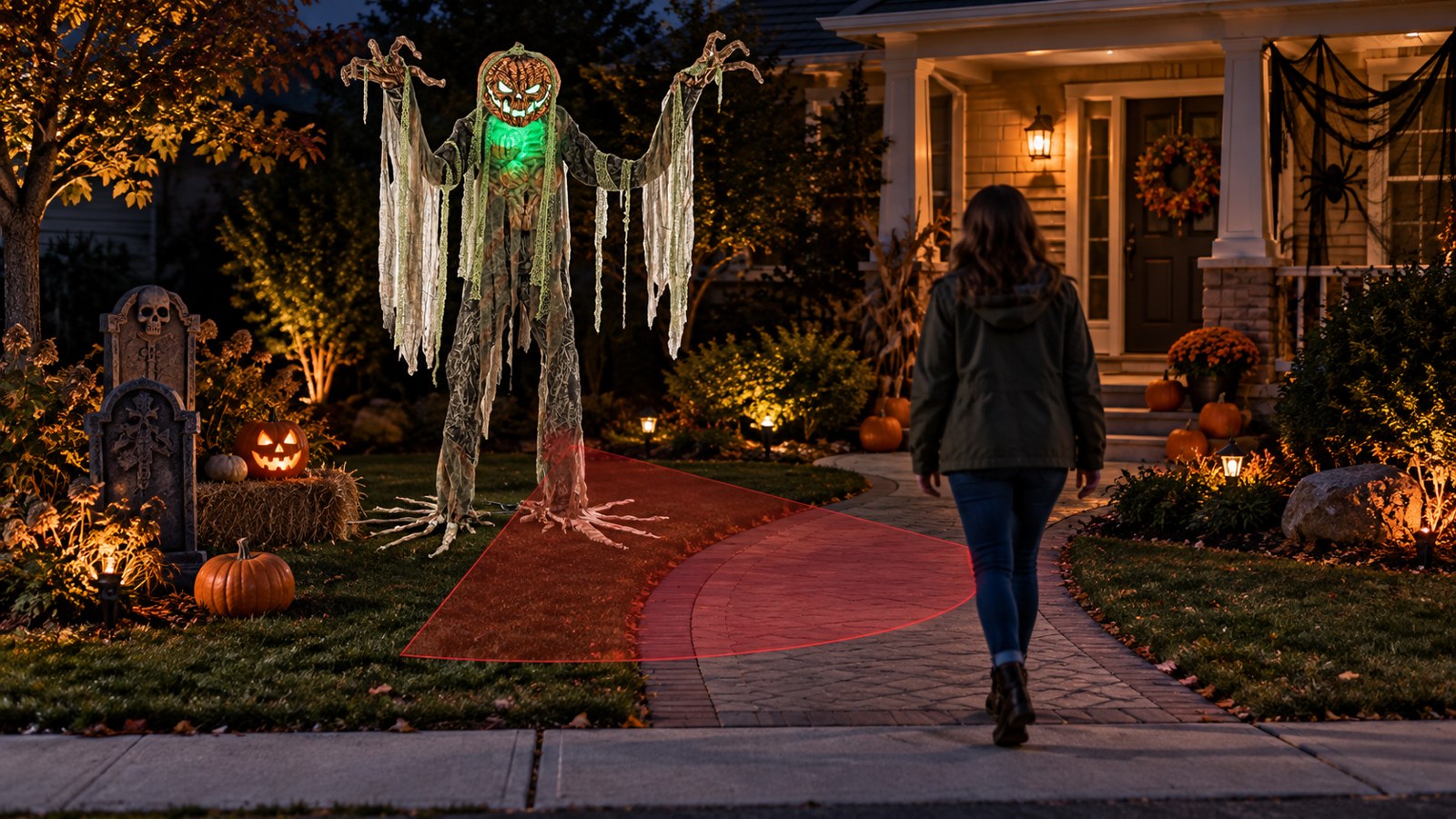
The big advantage is convenience. Visitors do not need to know that a trigger exists, and you do not have to place anything directly under their feet. A sensor can also cover people approaching from slightly different angles, which is useful for a front-yard display where guests do not walk in a single-file path.
Several current animatronics from The Horror Dome use an infrared sensor advertised to work at distances of up to 6.5 feet in any lighting condition. Examples include the Root of Evil Animated Halloween Prop, Crouching Clown Red, and Lunging Haggard Witch.
That published range is a useful starting point, not a promise that every scene will behave identically. The sensor's height, angle, nearby movement, guest speed, and physical obstructions can all affect when the prop activates. Test the finished display from the direction a visitor will actually approach.
Where motion sensors perform best
A motion sensor is usually the better choice when:
- The display is unattended.
- Guests can approach from more than one direction.
- The floor is grass, gravel, stairs, or another surface where a pad would be awkward.
- You want a clean setup with no trigger cable across the walking path.
- The scare does not depend on split-second timing.
- Children, trick-or-treaters, or casual visitors may not follow a tightly controlled route.
Think of a seven-foot tree creature standing beside a porch. The effect works as long as it wakes up while the visitor is nearby. It does not need to wait until the guest's toe crosses an exact line. That is a strong motion-sensor scene.
Where motion sensors struggle
The same broad coverage that makes a motion sensor convenient can make it less precise.
It may fire when a guest is still too far away. It may see traffic in a neighboring walkway. Depending on the sensor and the environment, pets, moving décor, passing guests, or activity outside the intended path may also create unwanted activations. If an animatronic has a long reset period, one early trigger can leave the next group staring at a silent prop.
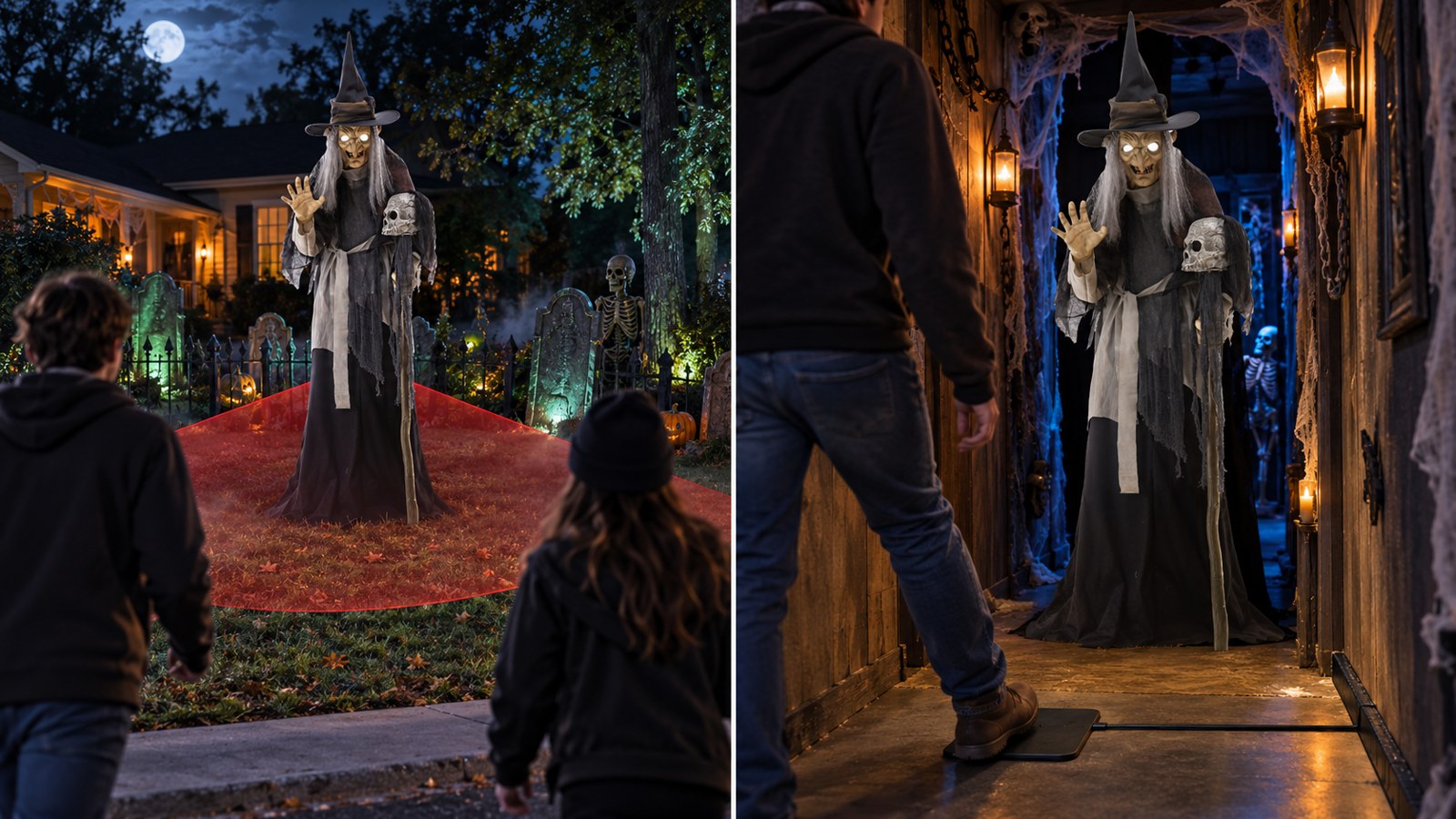
This is especially noticeable in a garage haunt. Imagine a lunging witch hidden just beyond a doorway. If its sensor can see through that doorway, it may activate for the previous group as they exit the nearby scene. By the time the next guest reaches the witch, the surprise is over.
In that layout, a step pad placed after the doorway gives you better control.
How a Step Pad Trigger Works
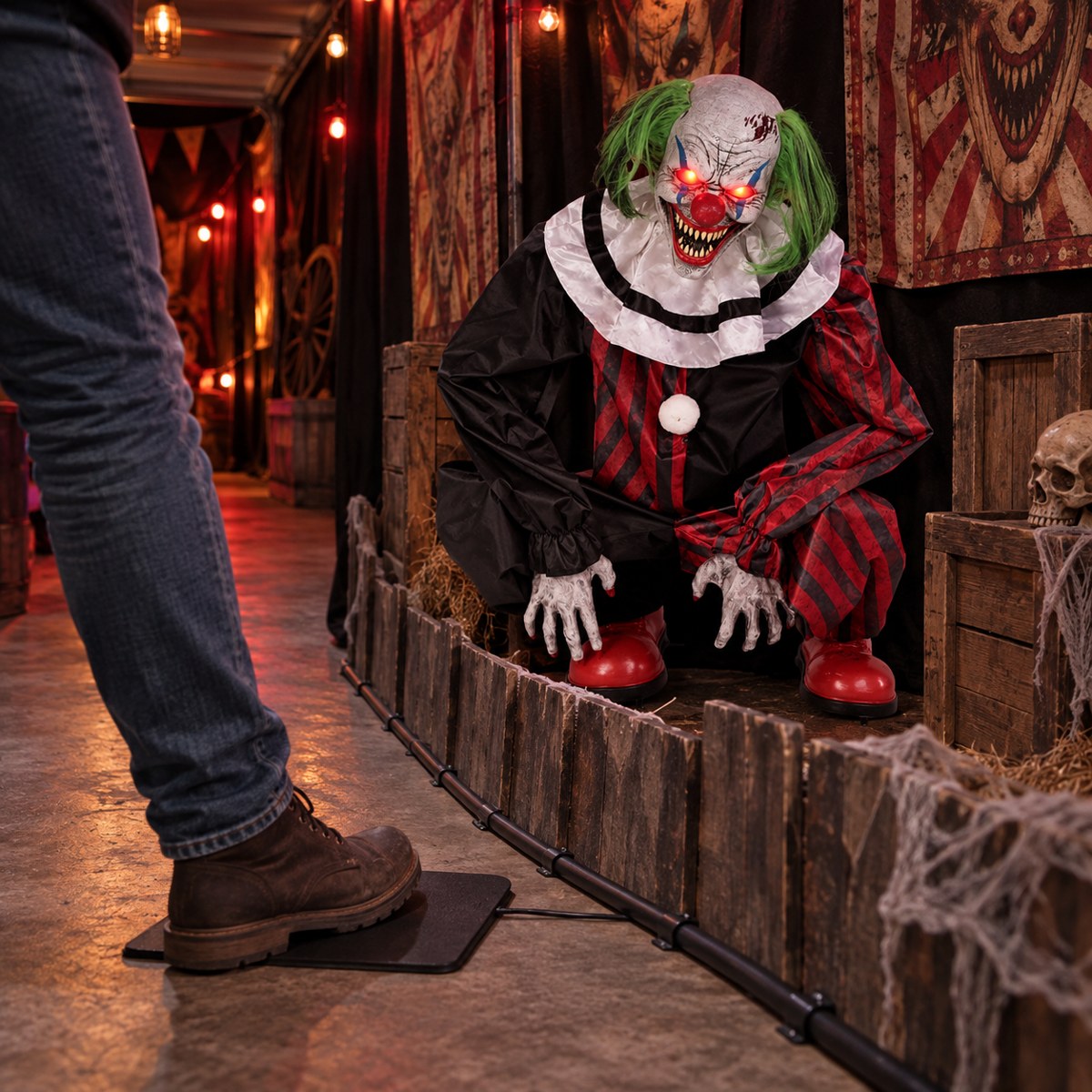
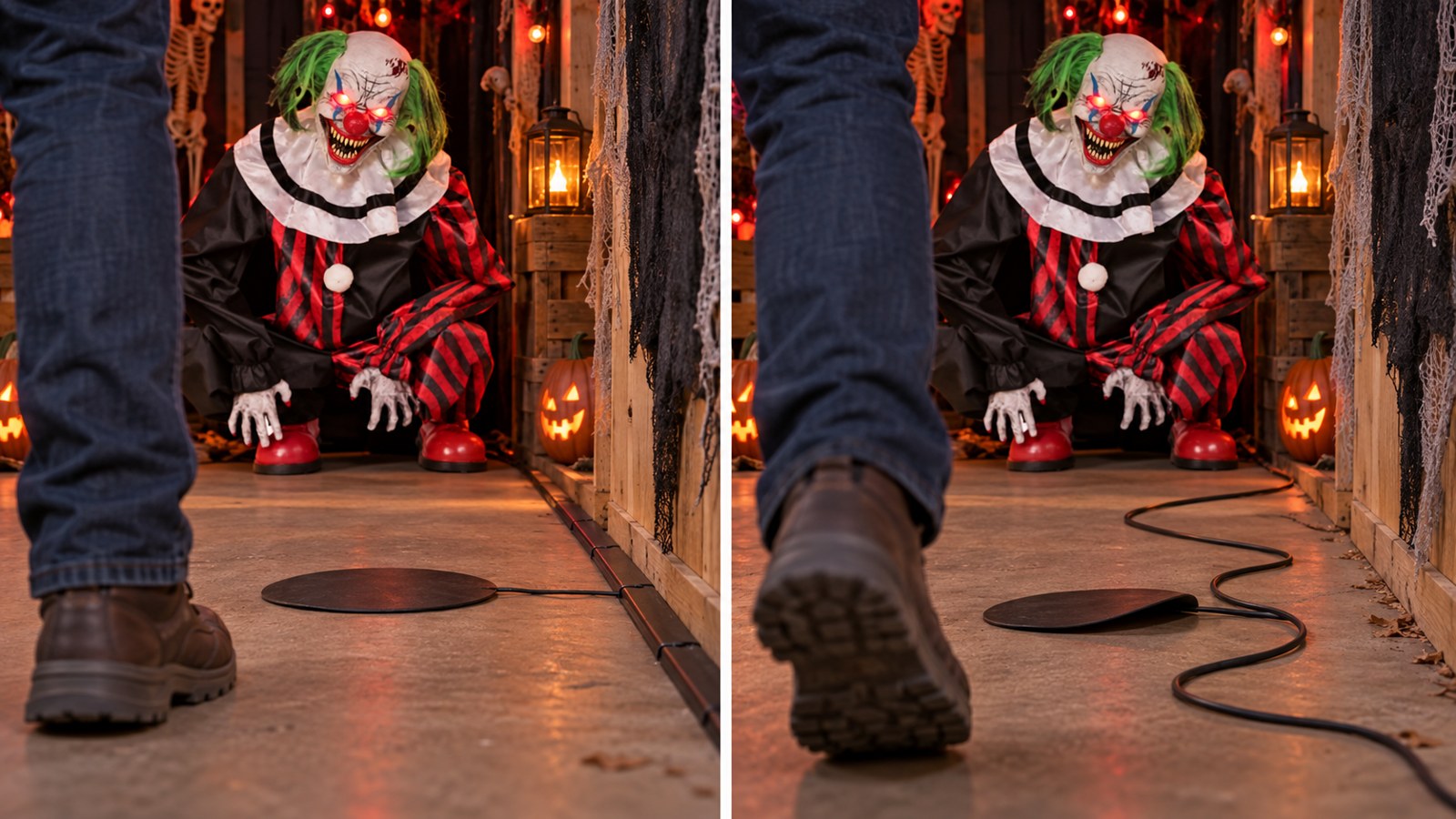
A step pad is a pressure-activated switch connected to a compatible animatronic. When a guest puts enough weight on the pad, the switch closes and starts the prop.
Its biggest advantage is simple: the guest must reach a specific place before the animation begins.
That lets you build a scare around timing. Put the pad where a visitor turns a corner, leans toward a static display, reaches for a bowl of candy, or enters the animatronic's ideal viewing zone. The prop stays quiet until that moment.
The Horror Dome currently lists step-pad activation alongside infrared-sensor and steady-on modes on several props. The Root of Evil, Crouching Clown Red, and Lunging Haggard Witch product pages state that a Step-Here Pad is included. The Wailing Phantom Animated Prop also lists motion-sensor, step-pad, and steady-on activation modes; because its page contains differing language about the pad, confirm the current box contents before ordering.
Where step pads perform best
A step pad is usually the better choice when:
- The scare must happen at an exact mark.
- Guests travel through a narrow, controlled path.
- The animatronic is concealed around a corner or behind scenery.
- Nearby activity would repeatedly trigger a motion sensor.
- You want guests close enough to see the full movement, but still outside the prop's operating space.
- An actor or attendant can watch the scene and adjust the flow if necessary.
A narrow hallway is the classic example. The pad sits at the natural midpoint of the path, the visitor steps on it, and a phantom begins moving just as the guest looks toward the next doorway. That is difficult to reproduce with a broad sensor aimed down the hall.
Where step pads struggle
A pad only works if someone steps on it. Guests may notice it and walk around it. Children may stride over it. A group may bunch together so that the first person starts the sequence before the rest can see it.
The cable also needs thoughtful routing. It should never create a trip hazard, cross an exposed walking path, or sit where water can reach a component that is not rated for that environment. Use the manufacturer's instructions, keep the connector compatible with the prop, and secure the cable without crushing or modifying it.
Do not solve a missed-pad problem by hiding the trigger under a thick mat unless the manufacturer says that setup will still work. Too much padding may prevent reliable activation, while a loose cover can create its own safety problem.
Which Trigger Gives Better Scare Timing?
For precise timing, the step pad wins.
A well-placed pad creates a physical activation point. You decide where the guest will be when the routine starts. That is valuable for a lunging prop, a drop panel, or any effect that needs the visitor looking in a particular direction.
A motion sensor gives you a zone rather than a mark. You can improve its timing by changing its angle, height, or sightline, but it will still respond to movement within the area it can detect. That is fine when the scene has a wide visual reveal. It is less ideal when the difference between six feet and three feet changes the entire scare.
There is one important exception: a step pad is only precise when the path forces guests to cross it. In an open driveway, it may be the least predictable choice because people can simply walk around it. A motion sensor covering the approach can be more reliable even if it is not as exact.
Which Trigger Is More Reliable?
Reliability depends on the environment.
In an open display, a motion sensor often activates for more visitors because they do not have to hit a small target. In a controlled hallway, a step pad often produces more consistent timing because every guest crosses the same point.
Use this quick test:
- Stand where the animatronic will be installed.
- Identify every realistic approach path.
- Mark the place where the animation should begin.
- Ask whether every guest will step on that exact place.
- If the answer is no, determine whether a motion sensor can cover the approaches without seeing unrelated traffic.
Whichever trigger creates fewer exceptions is the more reliable one for that scene.
Motion Sensor vs. Step Pad for Common Halloween Setups
Front-yard display
Best starting choice: motion sensor.
Yard visitors spread out. Some stay on the sidewalk; others cross the lawn or approach from the driveway. A sensor is more likely to catch that varied movement than a single pad. Aim it toward the intended viewing area, not the street, and run several tests after dark with the rest of the décor moving.
Porch or candy station
Best choice: depends on the action.
Use a motion sensor if the animatronic should greet anyone approaching the porch. Use a step pad if the scare should begin when a visitor reaches the candy bowl or arrives at the top of the steps. Keep the pad and its wire away from stair edges and the main footfall area unless the manufacturer-approved installation can be made flat, visible enough for safety, and secure.
Garage haunt
Best starting choice: step pad.
Garage haunts often have narrow routes and several effects packed close together. A motion sensor may see guests in the previous or next scene. A pad at a doorway, turn, or scenic focal point gives the animatronic a cleaner cue.
Professional haunted-attraction hallway
Best starting choice: step pad or operator-controlled trigger.
Precise throughput matters. If groups enter too close together, even a perfectly placed pad cannot make a long animation reset faster. Match the trigger plan to the prop's cycle and the attraction's spacing rules. For a high-throughput installation, confirm that the prop and trigger are designed for the intended duty cycle.
Photo opportunity or static display
Best starting choice: motion sensor or steady-on mode.
If visitors linger, a step pad may cause repetitive activation. A motion sensor positioned at the entrance to the photo area can start the effect once as people arrive. If the product supports steady-on operation and continuous movement suits the scene, that mode may be even simpler.
Outdoor path with grass or uneven ground
Best starting choice: motion sensor.
Uneven ground makes it harder to place a pad flat and route its lead safely. Unless the trigger is explicitly suited to the surface and weather exposure, keep it out of that path. Mount the animatronic according to its instructions and use the onboard sensor from a stable position.
How to Place a Motion Sensor for a Better Scare
Do not judge the sensor while standing beside the prop and waving a hand in front of it. Test it as a visitor.
1. Build the complete scene first
Fabric, corn stalks, hanging ghosts, doorway curtains, and other scenery can change the sensor's view. Put the final pieces in place before deciding that the factory angle works.
2. Aim across the approach when possible
Many motion-detection setups respond more consistently when a person crosses the detection area instead of walking straight toward a narrow part of it. The exact behavior depends on the sensor, so treat this as a testable placement idea, not a universal rule.
3. Limit what the sensor can see
Turn the prop away from sidewalks, adjacent scenes, waving branches, and queue traffic. Scenic walls or other stable set pieces can help define the activation lane, provided they do not interfere with the animatronic's moving parts or ventilation.
4. Test at adult and child height
A sensor that catches an adult torso may react differently to a small child, especially if scenery blocks the lower part of the approach. Walk the route at different heights and speeds.
5. Time the entire routine and reset
Record when the movement begins, how long it lasts, and how soon the prop can activate again. Then test with two groups entering close together. A trigger plan is only successful if it works with real traffic.
How to Place a Step Pad Safely and Effectively
1. Put it at a natural choke point
Doorways and narrow turns are useful because visitors already have limited options. Do not create an unsafe bottleneck or place the pad where someone may stumble while avoiding a moving prop.
2. Keep guests outside the animatronic's movement area
The perfect activation mark is not the closest possible mark. It is the closest safe viewing position specified by the manufacturer and your venue rules. Watch the complete movement before opening the scene.
3. Secure the pad and cable
Place the pad on a stable surface. Route the cable along a wall, scenic edge, or protected path rather than loosely across the floor. Use only securing methods appropriate for the surface and cable, and follow all product instructions.
4. Camouflage without disabling it
Blend the trigger into the scene, but keep the covering thin, flat, and secure if the instructions permit a covering at all. Test it with different shoes and walking styles.
5. Give the guest a reason to step there
Lighting, scenery, and path design can guide visitors more reliably than a printed “step here” graphic. A pool of light, a doorway centerline, or a visual focal point beyond the pad naturally pulls feet toward the activation mark.
The Best Option: An Animatronic With Multiple Activation Modes
It is hard to predict a trigger perfectly from a product page. The scene may change after you add walls, fog, sound, and a line of guests. That is why an animatronic with motion-sensor, step-pad, and steady-on modes gives you useful flexibility.
At the time of checking, these real products from The Horror Dome advertised multiple activation choices:
- Root of Evil Animated Halloween Prop — $409.99; approximately seven feet tall; steady-on, included Step-Here Pad, or infrared sensor with an advertised range of up to 6.5 feet.
- Crouching Clown Red — $289.99; steady-on, included Step-Here Pad, or infrared sensor with an advertised range of up to 6.5 feet.
- Lunging Haggard Witch — $374.99; over six feet tall; steady-on, included Step-Here Pad, or infrared sensor with an advertised range of up to 6.5 feet.
- Wailing Phantom Animated Prop — $399.99; approximately seven feet tall; product page lists steady-on, motion-sensor, and step-pad activation. Confirm whether the pad is included before purchasing because the page contains inconsistent wording.
Prices, stock, included parts, and specifications can change. Recheck the product page before buying.
A Practical Trigger Test Before Opening Night
Set aside 20 minutes and recruit two or three people who did not build the scene. They will move more like real guests because they do not know where the trigger is.
Run this test:
- Send one person through slowly.
- Send one person through quickly.
- Send a pair side by side.
- Send a group with only a short gap behind the first visitor.
- Test the shortest and tallest people available.
- Turn on every nearby light, sound effect, moving prop, and fog machine.
- Watch for early activations, missed activations, exposed cables, and guests stepping into the prop's operating area.
If a motion sensor fires early, narrow or redirect its view by changing the prop's position or scene layout. If a step pad is missed, move it into a more natural footpath instead of making guests hunt for it.
The goal is not merely to make the prop activate. The goal is to make it activate at the right moment, for most visitors, without creating a new hazard.
Buying Checklist
Before choosing an animatronic or separate trigger, confirm:
- Which activation modes the product supports.
- Whether the step pad, sensor, or connector is included.
- The manufacturer's stated sensor range.
- Whether the trigger is proprietary or compatible with other props.
- The length and routing requirements of the step-pad cable.
- Indoor or outdoor use limitations for every component.
- The animation's full movement envelope.
- The routine length and reset behavior.
- Power requirements and volume control.
- Return, replacement, and support policies.
If the product page is unclear about an included trigger, ask before ordering. A compatible connector and the correct activation mode matter more than the pad's appearance.
Final Verdict
Choose a motion sensor for convenience and broader coverage. Choose a step pad for control and exact timing.
For a front yard, porch approach, or unattended display, motion activation is usually the practical winner. For a narrow hallway, doorway, garage haunt, or carefully staged lunge, a step pad gives you the cleaner scare.
If you have not built the final scene yet, buy an animatronic that supports both. Test the motion sensor first. If it activates too early or catches the wrong traffic, switch to the pad and create a natural choke point. That flexibility can rescue a scene without replacing the prop. If you are buying your first prop, set a complete animatronic budget before choosing the model.
Browse The Horror Dome's current Halloween animatronics and check each product page for supported activation modes, included parts, indoor/outdoor limitations, and current availability.
Frequently Asked Questions
Is a motion sensor or step pad better for Halloween animatronics?
A motion sensor is generally better for open, unattended displays and visitors approaching from several directions. A step pad is better when the scare must begin at one exact spot in a controlled walking path.
How far away will a Halloween animatronic detect motion?
It depends on the product. Several current Horror Dome animatronics advertise infrared-sensor activation at distances of up to 6.5 feet in any lighting condition. Treat the listed range as a starting point and test the completed scene from every approach.
Can I use any step pad with any Halloween animatronic?
No. Connectors, wiring, and trigger requirements can vary. Use the pad supplied or recommended by the manufacturer, or confirm compatibility before connecting a separate trigger. Do not modify electrical connectors unless the manufacturer explicitly supports it.
Where should I put a step pad for a jump scare?
Place it at a natural choke point where the guest will be in the intended viewing position but outside the animatronic's full movement area. Doorways and narrow turns often work well when the pad and cable can be installed flat and safely.
How do I stop a motion-activated prop from triggering too early?
Change the prop's position or sensor angle so it watches only the intended approach. Keep unrelated traffic and moving décor out of its view, then test at different walking speeds and heights with the full scene operating.
Can I hide a Halloween step pad under a rug?
Only if the manufacturer's instructions allow it. A thick or loose covering may prevent activation or create a trip hazard. Any cover should remain flat and secure, and the trigger must be tested with real foot traffic.
What does steady-on mode do on an animatronic?
Steady-on mode generally keeps the prop's programmed operation running without waiting for a motion sensor or step pad. Exact behavior varies by model, so check the product manual before using it for a continuous display.
Should I use a step pad outdoors?
Only when the manufacturer says the pad, cable, connectors, and animatronic are suitable for the location and conditions. Uneven or wet ground can make pad placement and cable routing unsafe, so a built-in motion sensor is often the simpler outdoor option.